DIY keyboard, part 1: planning a handwired, 3D-printed keyboard
DIY practical 3D print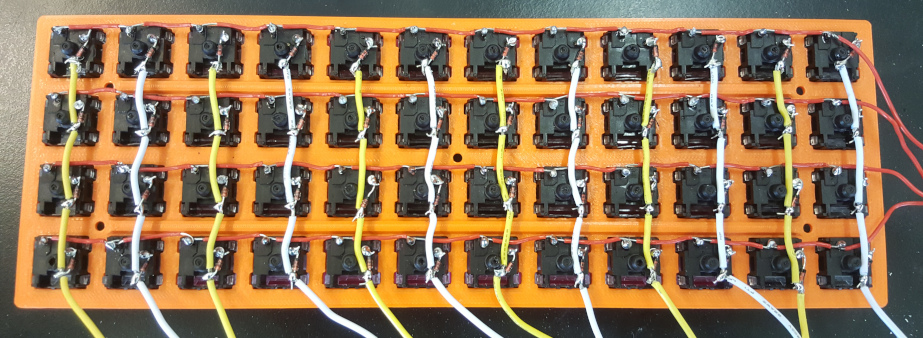
A colleague of mine has a fancy keyboard - the OLKB Planck. It is sold as a DIY kit that you assemble and program yourself. I was unsure how I feel about it when I first saw it. But his explanations quickly got me fascinated and I decided to make my own - even more DIY style. I would 3D print everything and make some improvements like bluetooth. Another problem he had with his was the lack of a way to indicate on which layout level you are. And maybe a gesture sensor to swipe with. And maybe a gyroscope to use it like a mouse or driving wheel.
First I decided to go simple and just make a keyboard without bluetooth or anything fancy. Then learn from the mistakes and improve to make a second one that is closer to the real goal.
I ordered cheap switches and a pcb to make the process easier. At this point I thought that a big step of this project will be coming up with a good layout for my needs. Also because I take key bindings too seriously.
I found 3D models from the original designer and decided to print them. I also found a model of a keycap and modified it to make it printable without much support and add a bump for the index fingers. The keycaps turned out not fitting the switches, so I had to rework them a few more times.
The 3D models can be found here on my github.
The pcb was not fitting the models I found and was not very happy with them anyway, and they were not designed to be 3D printed to start with. I started planning how could I make a case that does not use bolts and nuts.
I printed a few simple clips to see if I could use those. Some of them I printed improperly, some were very stiff and I struggled to design better ones. I realised something very important then: instead of going for a perfect solution I should have gone for a satisfactory one and improve when needed.
I immediately made a few simple holes in a new top half model and found some M3 and M2 12mm bolts. After that I started designing a new bottom case, but adjusting its height would have to wait.
Another problem was that I damaged or bricked the PCB so I also had to start again with that. The big problem was that I had soldered the switches onto the PCB, so I had to unsolder them one by one. It cost me 4 hours and a few burns to do that. But I did learn to do less ambitious planning upfront. I will never forget this lesson because fixing broken switches is one of the most tedious and fiddly things I’ve ever done.
The next step was to figure out how to use an Arduino for the keyboard: I could flash it with the QMK firmware, or write some code myself.
Detecting button presses on 48 keys with fewer than 48 pins is not straightforward. So I found a few excellent blogs on how matrix scanning works:
- https://pcbheaven.com/wikipages/How_Key_Matrices_Works/
- https://komar.blog/posts/how-to-make-a-keyboard-the-matrix/
After understanding the hardware I did some searching. First I found the matrix scanning code in a file from the Keypad library for Arduino. Then I found a file from a stenography keyboard open source project, which also did a similar job. It was very helpful to learn from this available code.
Making a keyboard without a pcb is called handwiring and I found a nice post about it: https://geekhack.org/index.php?topic=87689.0.
With the plan changed, and my student budget limits, I actually had more fun finding my way through.